CERBERUS
> Hardware detection, diagnostic, and benchmark tool for vintage DOS PCs.
A DOS-native tool that detects, diagnoses, and benchmarks vintage PC hardware, then shows it working through a visual journey of six hardware demonstrations before cross-checking the results.
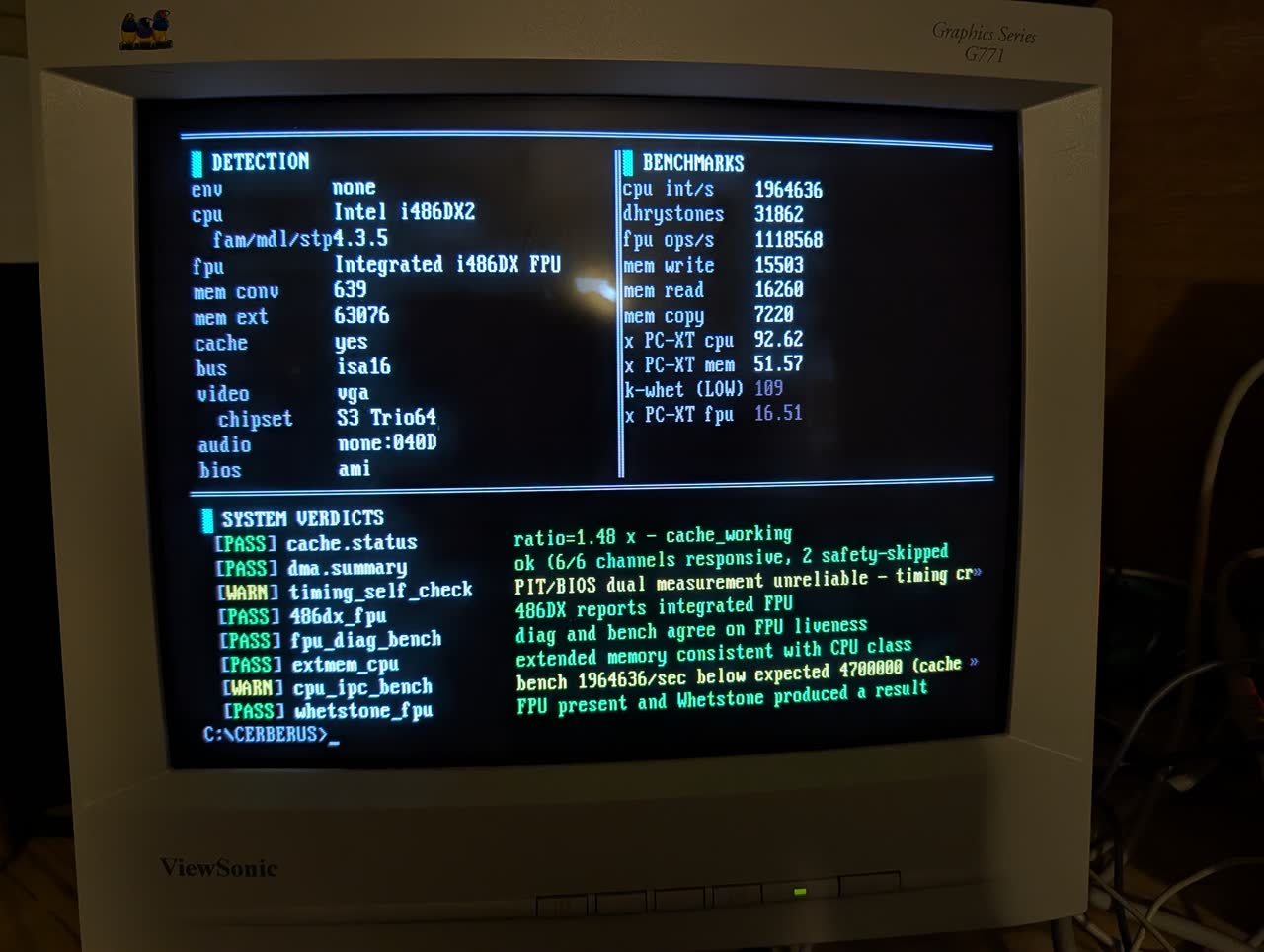
v0.8.1 tagged 2026-04-22, same-day completion release on top of v0.8.0. Closes the IEEE-754 edge-case diagnostic, /CSV output mode, L1 pointer-chase latency probe, L2 reach via a 64 KB FAR buffer, DRAM ns derivation, Hercules variant discrimination (HGC/HGC+/InColor), IIT 3C87 DB row + routing, and Genoa ET4000 chip-level probe. 376 host-test assertions green. v0.8.0 tagged earlier the same day. Active development paused 2026-04-23 while I (Tony) focus on NetISA (all hardware delivered 2026-04-23: new, exciting, wants my attention). The v0.8.1 tag is production-ready and the v0.9.0 plan is fully scoped at docs/CERBERUS_0.9.0_PLAN.md whenever development resumes. Parking notes at PARKING.md. The trust-first release: every shipped number has been verified on real iron, captured from a BEK-V409 486 DX-2-66 and a 386 DX-40 + IIT 3C87. The release is deliberately smaller than the v0.7.1 envelope: Whetstone emit is suppressed in stock builds (kernel was 10-30x below the published reference band on real silicon), the runtime upload to barelybooting.com is compiled out of stock binaries (returning in 0.9.0 with a stack-safe offline fallback). What shipped is production-quality: CUA-lite UI (F1 help overlay, F3 exit, Norton-style F-key legend, /MONO flag, CGA snow-safety gate), 5-axis FPU behavioral fingerprint, 6-stride cache characterization including line=32/64 plateau detection for Pentium+, possible-causes narration on every FAIL/WARN consistency rule. 320 host-side assertions green across 9 test suites. Binary ~167 KB, DGROUP 59.5 KB / 64 KB. Four milestone commits on main (0.8.0-M1 through 0.8.0-M4) document the arc. Companion barelybooting-server still at v0.1.0: production-ready, awaiting the 0.9.0 CERBERUS upload-path revival to go live.
The visual journey (v0.6.0)
v0.6.0 turned CERBERUS from a tool that produces numbers into an experience that shows the hardware working. Eight title cards introduce eight demonstrations, each one genuine hardware computation made visible:
- CPU ALU Bit Parade. A 16-bit register displayed as a row of CP437 blocks. Real ROL / ROR / SHL / SHR / AND / OR / XOR / NOT / ADD / SUB instructions execute in sequence. Wall-clock bounded at ~3 seconds. On an 8088 you see individual ops tick past. On a 486 DX-2 the pattern blurs. The speed difference IS the performance.
- FPU Lissajous. VGA mode 13h. 1800 parametric points
x = sin(3t + π/4), y = sin(2t)drawn one by one via native x87 FSIN. Amber oscilloscope aesthetic. A broken FPU produces visible distortion. - FPU Mandelbrot. After the Whetstone measurement, the FPU renders a Mandelbrot set in real time as a visual coda. Pixel by pixel, row by row. Genuine x87 iteration, not a lookup table.
- Memory Cache Waterfall. Nine horizontal bars, one per block size from 1 byte to 64 KB. Each bar fills at a rate proportional to its measured write bandwidth. The cache boundary shows as a speed transition.
- Cache Latency Heat Map. A 64-cell horizontal heat strip across 32 KB of address space. Green = L1 speed, yellow = intermediate, red = main-memory speed. On a 486 with 8 KB L1 the boundary is a sharp color transition.
- PIT Metronome. A dot bounces at 18.2 Hz, with a PC-speaker click per tick. Steady rhythm means the timer is healthy. Stutter means a TSR is stealing ticks.
- Video Bandwidth. The pattern fill IS the measurement. What you see on the CRT is the CPU’s write loop against VRAM.
- Audio Hardware Scale. Eight-note C major scale with rising frequency bars. Probes three paths in order: SB DSP direct PCM → OPL2 FM synthesis → PC speaker. The on-screen heading tells you which path won.
The journey ends with the scrollable summary: three directional Cerberus heads (facing left for Detection, forward for Benchmarks, right for Verdicts) guarding their domains. Every detected value, every benchmark number, every consistency verdict rendered in 80 columns of CP437 block art. No information truncated, no row budget cap.
Community upload (deferred to 0.9.0)
The upload path (POST CERBERUS.INI to barelybooting.com via mTCP HTGET) shipped in v0.7.x but is compiled out of stock v0.8.0 builds. The v0.7.1 real-iron validation surfaced a stack overflow when barelybooting.com was unreachable, and the trust-first cut for v0.8.0 was to remove the surface entirely rather than ship a partially-working feature. Rebuild with wmake UPLOAD=1 for research use; the full revival with a stack-safe offline fallback is the 0.9.0 work.
The server side is still there waiting: v0.1.0 shipped 2026-04-21 as a small Flask + SQLite app, deployable as a Docker image behind a Cloudflare Tunnel, red-teamed before first traffic. It enforces the upload contract strictly (ASCII only, 64 KB ceiling, 32/128 char caps on nickname/notes), rate-limits submissions by true client IP (CF-Connecting-IP, not edge IP), and ships with a CSP + frame-deny response header so a future markup slip cannot escalate to stored XSS. The container runs read-only, drops all Linux capabilities, and has no-new-privileges set. When the client path returns in 0.9.0 the server is ready.
The INI format stays frozen at ini_format=1 with a documented backward-compatibility commitment, see the server API contract. v0.8.0 captures are already format-compatible with the future upload endpoint; no data migration will be needed when the path re-opens.
What’s new in v0.8.0
Four milestones in a 36-hour arc:
- M1 (trust-first foundation). Whetstone emit suppressed in stock builds (Curnow-Wichmann kernel reads 10-30x low on real 486 silicon vs the published reference band; shipping an honest “not in stock” beats a misleading number). Upload path compiled out (see above). End-of-run
_exit()bypass fixes a Watcom libc teardown hang on BEK-V409 that locked the machine after Q-exit. Nickname buffer leak fixed (issue #9).cpu.classnow emits a normalized family token (486, pentium, pentium_pro) instead of the vendor string.bench_cpuDB anchor widened after BEK-V409 real-iron measurement came in outside the original DOSBox-X-seeded band. - M2 (precision expansion). FPU behavioral fingerprint grows from 4 axes to 5: added FPTAN-pushes-1.0 probe (387+ vs 8087/287). New rounding-control cross-check (4 modes against canonical FISTP(±1.5) results). New precision-control cross-check (3 significand widths, bytewise comparison). New exception-flag roundtrip (all 6 x87 exceptions deliberately triggered and cleared). Cache stride sweep extended to 6 points with stride=128 enabling line=32 vs line=64 inference on Pentium-era parts. Memory diagnostic gains checkerboard (0x55/0xAA) + inverse checkerboard for adjacent-cell coupling faults.
- M3 (CUA-lite interaction). Replaces the row-24 status bar with a Norton-style F-key legend (Borland 0x30/0x3F on color, ATTR_INVERSE on mono). F1 opens a help overlay with static nav reference; F3 exits; Esc cancels modal views; arrow keys and PgUp/PgDn navigate the scrollable summary. New
/MONOflag forces monochrome rendering (semantic palette: 0x07/0x0F/0x01/0x70/0xF0 for NORMAL/EMPHASIS/DIM/HIGHLIGHT/WARNING) regardless of detected adapter, for users with amber or green phosphor monitors on color cards. EGA/VGA getsAX=1003h BL=00hat startup for 16 background colors. All VRAM writes on CGA gate on a 3DAh retrace-edge poll to eliminate snow. - M4 (documentation parity). Every FAIL/WARN consistency-rule verdict now carries a second clause with possible causes: FAIL: 486DX but FPU not integrated (counterfeit SX relabel?). CERBERUS.md, README.md, methodology.md, and consistency-rules.md all refreshed against shipped state.
Deferred to 0.8.1: IEEE-754 edge-case diagnostic (9 operand classes x 5 ops), /CSV output mode, L1 pointer-chase latency probe, L2 detection via larger sweeps, DRAM latency derivation, IIT 3C87 discrimination. Full list in the v0.8.0 release notes.
CERBERUS is named after the three-headed dog of Greek myth that guarded the gates of the underworld. Each head is one of the three analysis domains:
- Detect. Identifies CPU, FPU, memory, cache, bus, video, audio, and BIOS using layered probes and a community-editable hardware database.
- Diagnose. Walks memory with test patterns, validates ALU correctness, runs bit-exact FPU ops, probes VRAM, checks cache stride, pings every DMA channel.
- Benchmark. Integer (Dhrystone 2.1), FPU (Whetstone), memory bandwidth, cache throughput, and video throughput passes with calibrated multi-pass mode for thermal analysis.
The three heads share a common body of timing, display, and reporting infrastructure. Their results feed a consistency engine that flags disagreements. This is the project's reason to exist.
The consistency engine
Most DOS diagnostic tools tell you what your hardware says it is. CERBERUS tells you when what your hardware says it is disagrees with how it behaves.
Eleven rules in force today, each emitting a consistency.* row in the INI with PASS, WARN, or FAIL:
- A 486DX must report an integrated FPU. If it doesn’t, that’s a counterfeit 486SX with a faked silkscreen, a real thing documented in the VOGONS archives.
- A 486SX must NOT report an integrated FPU. If it does, your detection is confused or someone sold you a remarked chip.
- A 386SX cannot be on an ISA-8 bus. It has a 16-bit external bus by design; the combination is electrically impossible.
- FPU diagnostic PASS and FPU benchmark result must agree. One head saying “it works” while the other couldn’t exercise it means something is wrong.
- Extended memory reported on an 8088 is physically impossible. 8088-class CPUs cannot address memory above 1MB.
- PIT Channel 2 timing must agree with BIOS-tick timing within 15% over a fixed interval. The two PIT channels share the 1.193182 MHz crystal but run independently. Disagreement catches 16-bit integer overflow bugs in the tool’s own timing code, the runtime backstop against a recurring bug class.
- Integer benchmark iterations per second must fall inside the CPU database's empirical range for the detected family and model. A 486 DX-2 reporting 2.2M iters/sec when the DB floor is 4.7M is evidence of thermal throttle, TSR storms, cache-disabled-in-BIOS, or a counterfeit remark. The narration consults the cache diagnostic: if cache is healthy, cache is exonerated and the WARN points at TSR or thermal. If cache is failing, that is the implicated cause. If cache status is missing or ambiguous, all three stay in play.
- 8086-class CPUs must be on an ISA-8 bus. PCI on a 4.77 MHz 8088 is not a thing.
- Whetstone benchmark completion must agree with the FPU detection report. If Whetstone produced a number, x87 executed, and a “no FPU” detection claim is wrong.
- XT-class CPUs (8086, 8088, NEC V20, V30) shipped only the master 8237 DMA controller. An XT-class CPU plus a responsive slave DMA channel is a detection contradiction.
- Mann-Kendall rank trend test on per-pass benchmark timings. Monotonic upward drift at α=0.05 flags thermal throttling: dusty heatsink, dying voltage regulator, failing capacitor.
Every rule documents what it catches AND what it structurally cannot. A rule that only catches asymmetric failures says so explicitly. Opacity is the anti-pattern.
Output
CERBERUS writes a machine-parseable INI file with every detected property, diagnostic verdict, benchmark result, and consistency-rule outcome. Each row carries a confidence indicator: HIGH when the probe is authoritative, MEDIUM when inferred, LOW when emulated or guessed. Running inside DOSBox-X automatically caps all confidence at MEDIUM because emulated hardware isn’t ground truth.
Two signatures land in every INI:
signature. SHA-1 over the seven canonical hardware-identity keys (CPU, FPU, memory, video, bus). Stable across tool versions on the same machine. Same hardware, different run → same signature.run_signature. SHA-1 over the full INI. Differs between runs even on the same machine. Two runs of the same machine with divergent run_signatures under the same signature is the counterfeit-CPU detection mechanism: behavior changed while claimed identity did not.
The benchmark as art
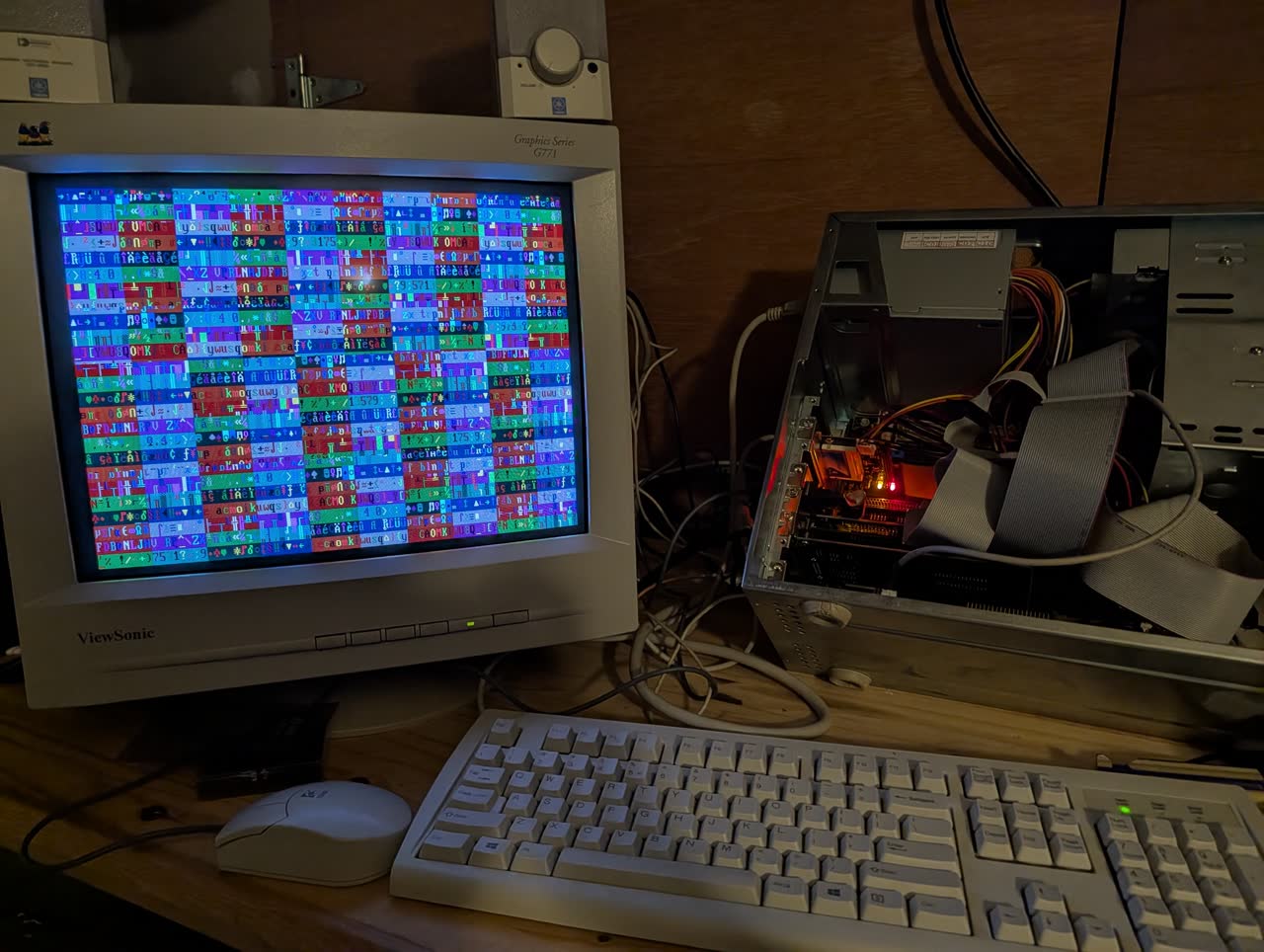
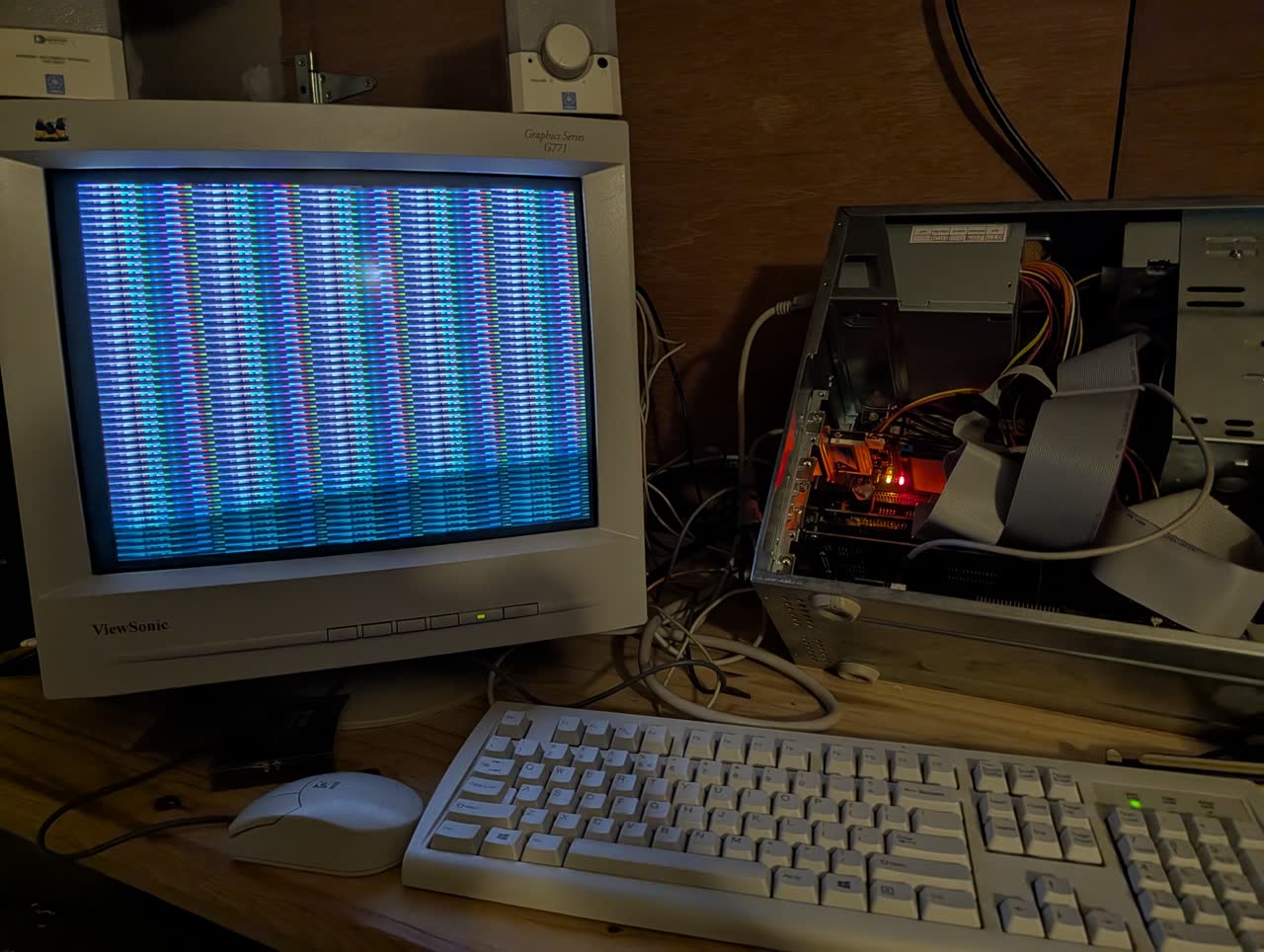
When bench_video runs, what you see on screen is the benchmark. The text-mode pass writes every CP437 glyph in every color-attribute combination to the 80×25 VRAM segment. The mode 13h pass writes horizontal stripes of palette data across the 320×200×256 framebuffer. Both passes are timed write-loops against memory-mapped hardware, and both are rendered live by the monitor that the memory is mapped to.
Target hardware
8088 support is a hard requirement, not an aspiration. Anything that breaks it is out.
Technical
128 seed entries across five identification databases (CPU 34, FPU 14, video 28, audio 31, BIOS 21). Every DB is a human-editable CSV with a Python build script that generates the C lookup tables. If CERBERUS can’t identify your chip, the raw probe data gets captured to CERBERUS.UNK and the summary tells you how to send the file in to grow the database.
Real-hardware validation
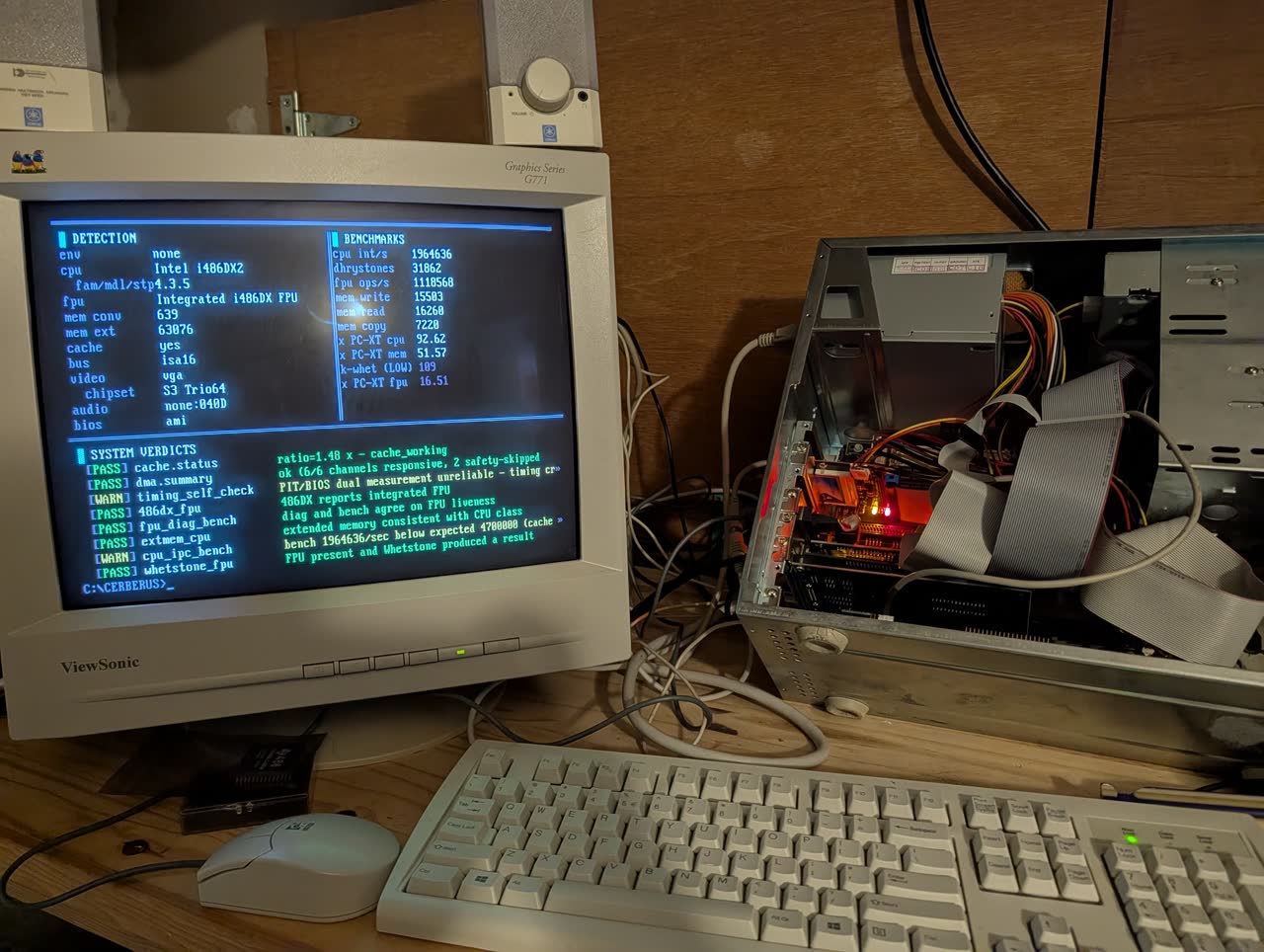
The v0.4.0 validation capture archived at tests/captures/486-real-2026-04-19-v0.4.0 is a full CERBERUS.INI from one bench-box run. Every diagnostic PASS. Two consistency WARNs on expected paths. cpu.dhrystones = 31,862 lands within 5% of CheckIt 3.0's reported number on the same hardware (33,609), which is the empirical agreement target for 486-class boxes. Not an algorithmic equivalence: Phase 2 Homage research confirmed CheckIt's “Dhrystones” is a custom synthetic, not a Dhrystone port.
Compared to other DOS diagnostic tools
If you’ve run retro PCs for a while you’ve used CheckIt 3.0, SpeedSys, Norton SYSINFO, QA-Plus, CHKCPU, TOPBENCH, PCPBENCH, or 3DBENCH. They’re all still useful. CERBERUS is not a replacement for any of them; it focuses on a different question.
The Homage research directory documents what CERBERUS learned from each one, with honest credit and no code copying. Short version:
- CheckIt 3.0 (TouchStone, 1988 to 1990). The reference point for the UI layout and the “Dhrystones” column. CheckIt’s Dhrystones is a custom synthetic, not a real Dhrystone 2.1 port; CERBERUS ships the actual Weicker reference code plus the synthetic for cross-calibration.
- SpeedSys (Vladimir Afanasiev). Memory bandwidth measurement methodology validated against SpeedSys’s cache-stride approach. CERBERUS’s
bench_cacheuses the same stride-doubling pattern. - Norton SYSINFO (Peter Norton, Symantec). The original “what IS this machine” tool. CERBERUS inherits its confidence-indicator approach (HIGH / MEDIUM / LOW per field) from SYSINFO’s asterisk-marks-inferred convention.
- QA-Plus v3.12 (DiagSoft). Professional service-technician tool; shipped as four cooperating binaries (control panel + destructive diag + RAM-locator + low-level format) because the RAM test needs to relocate DOS. CERBERUS learned the four-binary split pattern from QA-Plus and applies a simpler version for the scrollable summary.
- CHKCPU (Jan Steunebrink). Best-of-breed CPU identification across the full x86 lineage including Cyrix DIR-based pre-CPUID discrimination. CERBERUS’s CPU detection covers a smaller slice but with published empirical bench ranges used by consistency Rule 4b.
- TOPBENCH (Jim “Trixter” Leonard). Community-submitted machine fingerprint database keyed on BIOS CRC16. The inspiration for CERBERUS’s community-upload feature and dual-signature scheme.
- PCPBENCH, 3DBENCH, Chris’s 3d Benchmark. The Mode 13h pixel throughput references that CERBERUS’s
bench_video.mode13h_kbpswants to land near. Real-hardware anchor work is ongoing for issue #6.
What CERBERUS adds: consistency cross-checking between what hardware claims and what it actually does (eleven rules today), dual signatures for counterfeit-CPU and remarked-chip detection, Mann-Kendall thermal trend analysis over calibrated-mode multi-pass runs, a visual journey of eight hardware demonstrations that make the tool’s work legible instead of just numeric, and community upload to a browsable results database at barelybooting.com/cerberus/. None of the other tools do all of that.
When to reach for each: if you need exhaustive peripheral diagnostics, QA-Plus or CheckIt. If you need authoritative CPU ID across the Cyrix / NEC / IIT landscape, CHKCPU. If you need community-reference benchmark numbers, TOPBENCH. If you need to know whether a dodgy eBay 486DX is actually a 486SX with a remark job, CERBERUS’s consistency engine + signature pair is what the other tools don’t have.
FAQ
- Will it run on my 8088?
- Yes. 8088 + 256 KB + MDA is the hard floor. VGA-only visuals (Mandelbrot, Lissajous) skip gracefully on lower adapters; text-mode visuals (bit parade, PIT metronome, cache waterfall, latency heat map, audio scale) run on every adapter including Hercules. No 386+ instructions leak into the 8088 code path.
- Does it work in DOSBox-X, 86Box, PCem?
- Yes. CERBERUS detects the emulator and automatically caps all confidence values at MEDIUM, since emulated hardware isn’t ground truth. Benchmarks still run; results are still reproducible same-machine; but cross-tool comparisons against real-iron numbers should be flagged.
- My CPU / video card / sound card isn’t identified correctly.
- The identification databases live as human-editable CSVs in
hw_db/. 128 seed entries today across five databases (CPU, FPU, video chipset, audio chipset, BIOS family). When CERBERUS can’t identify your hardware, the raw probe data is captured toCERBERUS.UNK. Send that file in and it grows the database. - How is this different from CheckIt?
- CheckIt tells you what your hardware says it is. CERBERUS also tells you when what your hardware says disagrees with how it behaves. The consistency engine (eleven rules) catches counterfeit CPUs, remarked chips, thermal throttling, cache disabled in BIOS, TSRs stealing cycles, timing-code bugs, and frankenboard builds where detection claims something the hardware physically cannot do.
- What’s the community upload do?
- It shipped in v0.7.x and is compiled out of v0.8.0 stock builds pending revival in 0.9.0 with a stack-safe offline fallback. Rebuild with
wmake UPLOAD=1for research use. The server side is production-ready and waiting. When the path returns,CERBERUS.INIposts via mTCP HTGET; you browse submissions, filter by CPU class, and compare runs from the same machine over time. Anonymous by default; nickname + note via/NICK:and/NOTE:. - What’s in a CERBERUS.INI?
- Plain ASCII INI with every detected property, diagnostic verdict, benchmark number, and consistency-rule outcome. Two SHA-1 signatures (hardware identity + per-run). Full format spec at docs/ini-format.md. The format is frozen at
ini_format=1with a documented backward-compatibility commitment. - How does the results browser server work?
- Small Flask + SQLite app, about 700 lines of Python. Deploys as a Docker container with a
cloudflaredsidecar: Cloudflare Tunnel is outbound-only, so there’s no port forwarding and no public IP exposed. Runs happily on a Home Assistant OS mini PC. The intake endpoint is rate-limited (per-client, viaCF-Connecting-IP), enforces the INI contract strictly (ASCII only, 64 KB ceiling, length caps on user-supplied fields), and the whole container runs read-only with all Linux capabilities dropped. Source and deploy guide: BarelyBooting/barelybooting-server. - Will it damage my machine?
- No destructive operations. No low-level format, no disk writes outside the user’s working directory (
CERBERUS.INIand sometimesCERBERUS.UNK), no port writes outside documented probe targets with safety gates on the DMA refresh / cascade channels. This is a deliberate design choice; QA-Plus and similar tools bundled low-level format utilities which CERBERUS specifically rejects. - Is there a Windows version?
- No. CERBERUS is DOS real-mode only. The scrollable UI uses direct VRAM writes at B800:0000 (color) or B000:0000 (mono), which is not a thing on Windows. Run it under DOSBox-X if you don’t have real iron.
- License?
- MIT. Hardware databases are CC0. Contributions welcome.
Download
CERBERUS.EXE is attached to the v0.8.1 release at dl.barelybooting.com. Single-file DOS real-mode executable, ~171 KB. Drop it on a FAT16 volume, run from the DOS prompt, read the resulting CERBERUS.INI. Full release notes at the release page.
Known issues are tracked internally; the source archive includes the latest status in its docs.
Links
- BarelyBooting/cerberus source archive (source, hardware databases, consistency rule docs)
- v0.8.1 release page (CERBERUS.EXE, release notes)
- v0.8.1 release notes
- v0.8.0 release notes
- All releases (v0.4.0 through v0.8.1, release notes per milestone)
- barelybooting-server (companion web app that ingests uploaded CERBERUS.INI runs)
- barelybooting-server v0.1.0 release (production-ready: Docker image, Cloudflare Tunnel deploy guide, red-team hardening)
- INI upload contract (API spec between the DOS client and the server)
- INI format reference (every section, key, value type emitted by CERBERUS)
- Consistency engine methodology (what each rule catches and what it structurally cannot)
- Homage research (decompilation-led lessons from CheckIt, CACHECHK, QA-Plus, and others)
- Design document (the full architecture write-up)
- NetISA project page (the hardware side; NetISA's TLS path is reserved for v0.8.0+)
- Build log (milestones and progress)